Is Your Guest WiFi Putting Your Business at Risk? Why Network Segmentation Matters
Providing free, high-speed WiFi improves visitor satisfaction in offices, hotels, clinics, restaurants, and retail spaces across the UAE. However, sharing a single unmanaged network between customers and core operational systems creates severe cybersecurity vulnerabilities. Discover why network segmentation is essential to protecting your business assets.
Need to Secure and Segment Your Business WiFi Network?
FastWiFi’s certified network security engineers design and implement isolated guest networks, VLAN segmentation, bandwidth throttling, and firewall access controls for commercial properties across Dubai, Abu Dhabi, Sharjah, and all Emirates.
support@fastwifi.ae | Call or WhatsApp us today: +971 54 329 7829 | Serving All Over the UAE
Guest WiFi is now standard practice in offices, hotels, clinics, restaurants, cafés, retail stores, gyms, and commercial venues across the UAE. Offering seamless wireless access makes visitors feel welcome, keeps diners engaged, and allows clients to remain productive during meetings.
While providing free WiFi noticeably elevates customer satisfaction, business owners and IT managers must confront an urgent security question: Can guest users see, scan, or access your internal business network?
If guest devices and internal business equipment share the exact same broadcast domain or subnet, a security issue on a single visitor's smartphone or laptop can instantly jeopardize your entire digital operation. From accidental malware infections to deliberate network snooping, an flat, unsegmented network is an open invitation to disaster. This is where professional network segmentation becomes indispensable.
Unsure if your customer WiFi is isolated from your private files?
FastWiFi performs comprehensive network security audits, vulnerability scans, and wireless access point configurations across Dubai and the UAE.
WhatsApp Us Call UsWhat Is Guest WiFi?
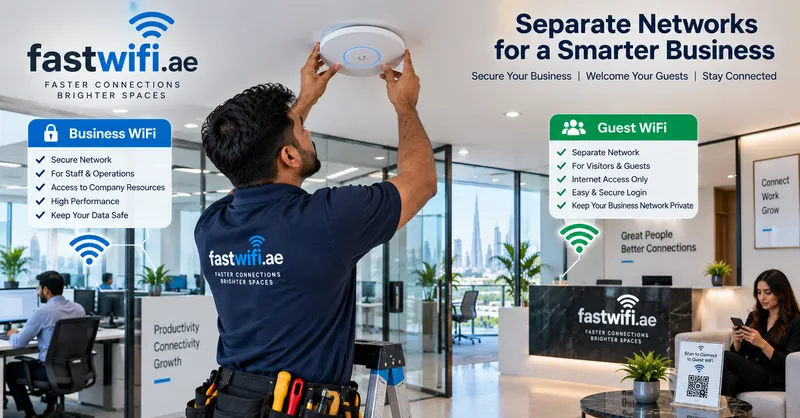
Guest WiFi is a dedicated, isolated wireless network designed specifically for visitors, customers, vendors, or contractors who need internet access but have zero operational need to interact with internal business infrastructure.
For example, a restaurant in Downtown Dubai or Dubai Marina may provide open or captive-portal WiFi for dining patrons, while waitstaff use dedicated handheld terminals on a private POS network, and back-office management connects via a secure corporate network.
These network paths must have distinctly separate access permissions, isolated subnets, and rigorous firewall boundaries. A visitor checking email while sipping coffee should never reside in the same digital space as your accounting software, employee workstations, or CCTV surveillance feeds.
Why Should Guest WiFi Be Separate?
A typical business network in the UAE contains mission-critical, confidential systems:
- Employee computers and laptops: Containing proprietary contracts, emails, customer databases, and financial spreadsheets.
- Network printers and copiers: Which frequently store cached print jobs, scanned confidential agreements, and unencrypted documents.
- File servers and NAS drives: Housing sensitive business records, payroll details, and company intellectual property.
- IP phones and PBX systems: Handling confidential client calls and executive voice communications.
- IP CCTV systems: Transmitting live security footage that must comply with strict local surveillance regulations (such as SIRA in Dubai or ADMCC in Abu Dhabi).
- Point of Sale (POS) terminals: Processing payment cards and customer transactions requiring strict PCI-DSS compliance.
- Cloud and on-premise business applications: ERP, CRM, and inventory databases essential to daily operations.
Guest users have no legitimate reason to access or communicate with any of these endpoints. Separating guest WiFi from the internal network eliminates unnecessary exposure, drastically reducing your digital attack surface.
What Is Network Segmentation?
Network segmentation means dividing a single physical computer network into distinct, isolated logical sections (subnets and Virtual Local Area Networks, or VLANs) and strictly enforcing traffic rules between them.
Rather than allowing every connected device to broadcast across a single flat network, an enterprise managed switch and commercial firewall create dedicated digital lanes:
VLAN 20: Guest WiFi (Internet-Only, Client-Isolated)
VLAN 30: IP CCTV Cameras & Access Control (Isolated, Encrypted)
VLAN 40: Point of Sale / Payment Registers (PCI-DSS Isolated)
VLAN 50: IoT Devices, Smart Displays & Air Conditioning Sensors
VLAN 60: Voice / VoIP Telephony (Quality of Service Prioritized)
Each segment operates under unique firewall policies. A customer on the guest network receives direct route access to the public internet, but their data packets are blocked immediately if they attempt to communicate with an internal server, office printer, or staff workstation.
What Can Happen Without Segmentation?
When guest devices, employee laptops, and operational systems share an unsegmented network, the risks are immediate and severe:
- Unauthorized Network Discovery: Anyone connecting to your WiFi can use free network-scanning mobile apps to identify every connected computer, server, network storage unit, and IP camera on your network, revealing IP addresses, device manufacturers, and open ports.
- Lateral Malware and Ransomware Spread: If a visitor connects an infected smartphone or laptop to your unsegmented WiFi, automated worms and ransomware can probe the local subnet, exploiting unpatched Windows vulnerabilities or weak network shares to infect company servers.
- Interception of Sensitive Data: Without client isolation, a malicious actor sitting in your waiting room or café can run packet capture tools (such as ARP spoofing or man-in-the-middle attacks) to monitor unencrypted data transmitted by neighboring devices.
- Rogue Access to Shared Hardware: Unsegmented guests can send unwanted print jobs to office printers, access shared network folders, or disrupt smart TVs and conference room displays during executive meetings.
- Regulatory Non-Compliance: The UAE Personal Data Protection Law (Federal Decree-Law No. 45 of 2021) requires commercial entities to implement robust technical safeguards to protect private records. Allowing unmonitored guest access to corporate subnets can breach statutory cybersecurity expectations.
Guest WiFi Does Not Need Access to Your Business Network
A simple, fundamental principle solves this dilemma:
Guests need internet access — not access to your internal systems.
A properly configured guest network allows customers, patients, or corporate visitors to browse websites, check messaging apps, and stream media effortlessly, while an invisible digital wall completely shields your servers, accounting tools, and staff hardware. This is especially vital for high-traffic environments where dozens or hundreds of unknown devices connect throughout the day.
Need a secure guest network with branded login in Dubai or Abu Dhabi?
FastWiFi configures customized captive portals, client isolation, and automated bandwidth controls to safeguard your company operations.
WhatsApp Us Call UsBusinesses That Should Implement Guest Network Segmentation
Network segmentation is not exclusive to global enterprises; small and mid-sized commercial operations across the UAE benefit immensely from isolated network architecture:
Corporate Offices & Law Firms
Protecting client files, confidential contracts, and server directories from visiting partners and vendors.
Medical Clinics & Healthcare
Shielding patient diagnostic data and electronic medical records (EMR) from waiting-room patient WiFi.
Restaurants, Cafés & Lounges
Isolating payment POS machines and kitchen order displays from public diner connectivity.
Hotels & Serviced Residences
Preventing guests in adjoining suites from discovering or connecting to each other's laptops or casting devices.
Retail Stores & Showrooms
Ensuring inventory tracking and surveillance cameras operate without interference from shoppers' phones.
Schools & Training Institutes
Separating student access from administrative grading servers, exam databases, and staff portals.
Network Segmentation for CCTV and IoT Devices
Guest WiFi is only one component of a modern segmentation strategy. Today's commercial facilities deploy numerous internet-connected smart devices:
- IP security surveillance cameras and Network Video Recorders (NVRs)
- Smart meeting room displays, Apple TVs, and video bars
- Biometric door access controllers and electronic turnstiles
- Smart thermostat controllers, lighting hubs, and power sensors
- Wireless staff printers and digital signage boards
Many IoT devices are notoriously vulnerable: their firmware is rarely updated by manufacturers, and they often contain hard-coded credentials. If an attacker compromises a smart television or security camera on an unsegmented network, they can use it as a persistent foothold to compromise corporate workstations. Placing IoT equipment and CCTV onto isolated VLANs prevents compromised devices from threatening corporate servers.
How to Improve Guest WiFi Security: Practical Measures
Securing your wireless environment involves several proven technical controls:
- Create a Dedicated Guest SSID and VLAN: Never hand visitors your internal WiFi password. Broadcast a separate wireless network name (e.g., "Company-Guest") mapped to an isolated VLAN.
- Enable Client Isolation (Layer 2 Isolation): Ensure that devices connected to the guest WiFi cannot communicate with or detect one another. Guests can only talk to the internet gateway.
- Implement Robust Firewall Policies: Configure your business router or Next-Generation Firewall (NGFW) to drop any traffic originating from the guest VLAN destined for internal private IP address ranges (RFC 1918 subnets).
- Deploy WPA3 and Enterprise Authentication: Protect your internal staff network with modern WPA3-Enterprise or 802.1X certificate-based authentication, leaving guest access password-managed or portal-based.
- Keep Network Equipment Updated: Regularly patch firmware on routers, firewalls, managed switches, and wireless access points to fix newly discovered vulnerabilities.
- Monitor Connected Clients: Utilize centralized cloud controllers to audit connected devices, spot rogue access points, and disconnect suspicious clients in real time.
Does Guest WiFi Affect Business Performance?
Without proper traffic management, it certainly can. If dozens of visitors stream 4K video, download heavy files, or run system updates over your guest network, your operational internet bandwidth can be severely depleted.
FastWiFi configures intelligent traffic-shaping controls:
- Per-User Bandwidth Caps: Allocating sensible download/upload limits (e.g., 10–15 Mbps per guest), ensuring no single user monopolizes bandwidth.
- Aggregate Guest Bandwidth Ceilings: Reserving the majority of your ISP pipe (e.g., 75–80%) strictly for business operations, VoIP, and POS registers.
- Session & Inactivity Timeouts: Automatically disconnecting idle devices to free up access point memory and wireless airtime.
- Content Filtering: Blocking high-bandwidth peer-to-peer torrents and illicit websites directly at the gateway.
Why Professional WiFi Design Matters
Network segmentation is not an isolated checkbox; it must be designed into your physical and wireless architecture from the ground up.
A professional installation by FastWiFi coordinates your incoming telecom connection (Etisalat or du), commercial firewalls, managed PoE switches, structured Cat6/Cat6A cabling, and commercial access points. We ensure seamless coverage, high client capacity, and bulletproof security across every room and outdoor terrace. Learn more about our specialized commercial WiFi solutions.
If your guest WiFi and internal business systems currently share the same network, it is time for an expert review. A properly engineered network delivers the fast connectivity your visitors expect while keeping your corporate data completely protected.
Brands We Support
We work with almost every popular router, access point, networking, and WiFi system brand available in the UAE market, ensuring complete hardware integration and security compliance:
We Serve
Secure network segmentation, enterprise WiFi installation, and infrastructure maintenance across all commercial sectors:
Serving All Over the UAE — Finding a Reliable Network Specialist Near Me
Whether you are searching for an expert WiFi technician near me, need urgent network isolation, or are upgrading commercial network switches, FastWiFi delivers rapid on-site dispatch across all seven Emirates:
Dubai:
Business Bay, Downtown Dubai, DIFC, Dubai Marina, JLT (Jumeirah Lake Towers), JBR, Palm Jumeirah, Dubai Media City, Dubai Internet City, Al Barsha, Al Quoz, Deira, Bur Dubai, Dubai Silicon Oasis, JVC, Dubai South, DWC, Dubai Investment Park (DIP), Al Qusais, Al Twar, Al Warqa, Nad Al Hamar, Tilal Al Ghaf, Damac Hills 2, Dubai City Walk, Dubai Hills Estate, Discovery Gardens, Arabian Ranches, Oud Metha, Al Khawaneej, Al Mizhar, Muhaisnah, Sobha Hartland, Meydan, Emaar South, Umm Ramool.
Abu Dhabi :
Al Maryah Island, Reem Island, Yas Island, Saadiyat Island, Khalifa City, Mussafah Industrial Area, Al Raha Beach, Mohammed Bin Zayed City (MBZ), KIZAD, ICAD, Corniche, Al Bateen, Al Khalidiyah.
Sharjah :
Al Majaz, Muwaileh Commercial, Al Nahda, Al Khan, Al Taawun, Al Qasimia, Sharjah Waterfront City, University City, SAIF Zone, Industrial Areas 1 to 18.
Northern Emirates:
Ajman: Al Nuaimia, Al Rawda, Al Jurf, Al Rashidiya.
Umm Al Quwain: Industrial Area, Al Salama.
Ras Al Khaimah: Al Hamra Village, Al Marjan Island, Nakheel.
Fujairah: City Centre, Port of Fujairah, Dibba.
Our Review Words Across the UAE
"FastWiFi restructured our medical centre network in Dubai Healthcare City. They created an isolated guest network for patients, a secure staff VLAN, and separated our CCTV and diagnostic servers entirely. The team was punctual, highly knowledgeable about UAE privacy compliance, and completed the transition with zero downtime."
— Operations Director, Specialist Medical Clinic, Dubai
"We run a high-volume restaurant in Downtown Dubai and were experiencing POS payment lags whenever the dining room was full of guests on our WiFi. FastWiFi deployed managed switches and isolated our payment registers from customer access, while capping guest bandwidth. Our POS transactions are now instantaneous. Highly recommended!"
— General Manager, Hospitality Group, Downtown Dubai
Expert Support Beyond Installation and Delivery
Reliable Ongoing Support After Installation
Our commitment doesn’t end with installation. We provide reliable ongoing support and maintenance to help keep your network fast, secure, stable, and performing at its best throughout the year. Whether you need troubleshooting, optimization, upgrades, or routine maintenance, our team is here to help keep your network running smoothly.
We offer proactive annual maintenance contracts (AMC), routine security audits, firewall rule updates, and emergency troubleshooting across all UAE commercial hubs.
Frequently Asked Questions
How can I test if our guest WiFi is currently isolated from internal computers?
Connect a personal smartphone or laptop to your guest WiFi network and attempt to ping or browse to the local IP address of your office printer, NAS storage drive, or internal server (e.g., 192.168.1.100). If the device responds or displays a login portal, your network is unsegmented and visitors have direct access to your internal hardware. FastWiFi can perform a comprehensive on-site security audit to verify your configuration.
Can I get a network security technician near me in Dubai or Abu Dhabi today?
Yes. FastWiFi maintains rapid-response mobile engineering teams stationed throughout Dubai, Abu Dhabi, and Sharjah. We provide same-day or next-day on-site consultations to implement VLAN segmentation, configure managed firewalls, and secure commercial wireless access points.
What hardware is required to set up proper network segmentation?
Proper network segmentation requires three core components: an 802.1Q VLAN-capable router or Next-Generation Firewall (NGFW), a managed Layer 2 or Layer 3 network switch, and business-grade wireless access points that support multiple SSIDs mapped to individual VLAN tags. FastWiFi supplies, configures, and integrates hardware from leading brands like Cisco, Fortinet, Ubiquiti, TP-Link Omada, and Ruijie.
What is Client Isolation (Layer 2 Isolation) and why is it necessary on guest WiFi?
While VLAN segmentation separates guests from staff computers, Client Isolation prevents guests from communicating with each other on the guest network. Without client isolation, a malicious user in your café or lobby can run network sniffing tools to intercept traffic from other visiting customers' laptops or phones. Enabling client isolation ensures every guest is completely private.
Do you provide maintenance contracts for commercial WiFi security and firewall management?
Yes. Our annual maintenance contracts (AMC) cover scheduled firewall rule audits, access point firmware patching, captive portal updates, bandwidth traffic optimization, and priority emergency technical support across all UAE locations.
Our Specialized Network & Infrastructure Services
Protect Your Business with Professional Network Segmentation
Speak with our certified network engineers today for an on-site security assessment, VLAN architecture design, captive portal setup, and enterprise WiFi configuration across the UAE.
Related Network Services
Guest WiFi Security Setup Dubai | VLAN Network Segmentation UAE | Commercial WiFi Firewall Configuration | Enterprise Access Point Isolation | Captive Portal Setup Abu Dhabi | POS Network Security Isolation | SIRA CCTV Network Segmentation | Clinic Patient WiFi Security Sharjah | Business WiFi Bandwidth Throttling | Hotel Guest Wireless Solutions | Low Voltage Network Contractor Dubai | WiFi Security Audit Near Me.
Popular Searches
How to separate guest WiFi from business network, why is my guest WiFi slowing down office internet, best router for guest network isolation Dubai, how to setup VLAN for CCTV and guest WiFi, PCI-DSS compliance for restaurant WiFi UAE, commercial network security technician near me, Fortinet guest network configuration, Cisco Meraki captive portal setup.