What Is BSS Coloring in WiFi 6? How Spatial Reuse Solves Wireless Interference
Optimizing High-Density Wireless Performance for Homes, Offices & Commercial Spaces
In high-density urban environments across the UAE, dozens of overlapping wireless networks compete for the exact same radio channels. Learn how WiFi 6 BSS Coloring (Basic Service Set Coloring) and spatial reuse revolutionize channel efficiency, eliminate unnecessary waiting, and keep your business and home connections fast and stable.
Need Help Fixing WiFi Interference or Upgrading to WiFi 6?
Connect with certified network engineers for prompt on-site RF spectrum analysis, enterprise access point deployments, channel de-confliction, and complete wireless optimization across the UAE.
support@fastwifi.ae | Call or WhatsApp: +971 54 329 7829 | Serving All Over the UAE
In traditional legacy wireless networks, wireless devices use a "listen-before-talk" mechanism known as CSMA/CA (Carrier Sense Multiple Access with Collision Avoidance). Under this protocol, when a client device or wireless access point wants to transmit data, it must first listen to the wireless channel. If it detects any ongoing transmission on the same frequency—even a distant, weak transmission coming from a neighbor's router in an adjacent apartment or office—it must pause, back off, and wait for the channel to clear before attempting to speak.
In modern urban hubs across the UAE, such as high-rise towers in Dubai Marina, bustling offices in Business Bay, and dense residential communities in Al Barsha or Sharjah, this legacy behavior leads to severe airtime starvation. Dozens of overlapping access points compete for the same radio spectrum, forcing devices to spend more time waiting than transmitting data.
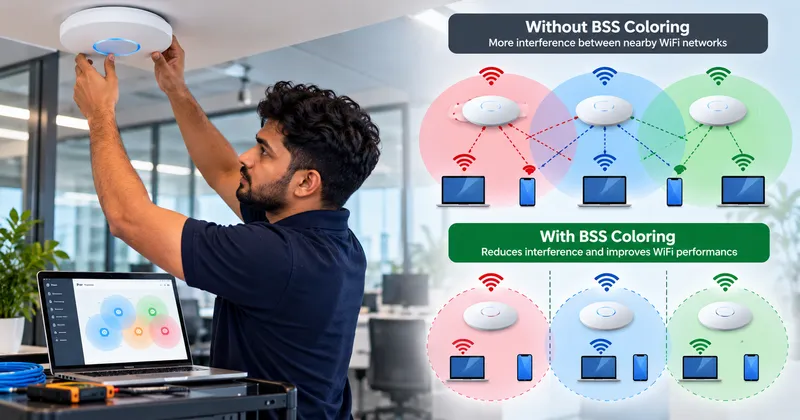
WiFi 6 (802.11ax) introduced a groundbreaking physical-layer technology called BSS Coloring (Basic Service Set Coloring) to solve this fundamental bottleneck. By tagging transmissions with distinct numerical color codes, compatible devices can instantly identify whether a detected signal belongs to their own local network or a neighboring network, opening the door to dynamic spatial reuse.
Struggling with slow WiFi in an apartment tower or busy office building?
FastWiFi conducts comprehensive RF site surveys, spectrum analysis, and WiFi 6 access point installations to eliminate channel congestion.
WhatsApp Us Call UsHow Does BSS Coloring Work?
At its core, BSS Coloring assigns a numerical identifier—a 6-bit tag ranging from 1 to 63—to every Basic Service Set (BSS). This tag is placed directly into the physical layer (PHY) header of every wireless transmission frame.
During ongoing wireless operation, compatible devices can immediately identify the BSS color included with a transmission without having to decode the entire data payload:
- Same BSS (Intra-BSS): The transmission carries the same color identifier, meaning the transmission belongs to the device's own wireless network. The device backs off and waits for its access point or client to finish transmitting.
- Different BSS (Inter-BSS / OBSS): The transmission carries a different color code, indicating it originates from an Overlapping Basic Service Set (such as a neighbor's router next door).
- Different BSS with a sufficiently weak signal: The device evaluates the signal strength against a dynamic clear-channel assessment threshold. If the signal is below the interference threshold, the device may be able to transmit simultaneously instead of unnecessarily waiting.
This helps wireless devices make significantly better decisions about channel access, unlocking simultaneous transmissions on the same frequency band without corrupting data.
Why Is BSS Coloring Important for WiFi 6?
WiFi 6 was designed specifically to improve real-world performance in increasingly crowded wireless environments rather than just pushing theoretical lab speeds.
Today, an office building or apartment complex in Dubai or Abu Dhabi may contain dozens of access points, hundreds of smartphones, laptops, smart TVs, cameras, IoT devices, and other wireless equipment competing for airtime.
When many networks compete for the same wireless channels, traditional channel access mechanisms can become remarkably inefficient. BSS Coloring helps improve this situation by supporting better spatial reuse.
BSS Coloring directly contributes to:
- Better overall WiFi efficiency across the entire building
- Improved radio channel utilization and higher throughput density
- Higher network capacity supporting hundreds of concurrent users
- Lower unnecessary waiting and reduced airtime contention
- Substantially better performance in dense corporate and residential environments
- More efficient wireless communication and reduced packet jitter
However, BSS Coloring does not eliminate interference completely. Proper channel planning, access point placement, transmit-power control, and network configuration remain essential to achieving enterprise-grade reliability.
How Does BSS Coloring Reduce WiFi Interference?
BSS Coloring mainly helps address the frustrating effects of co-channel interference (CCI).
Consider a multi-tenant commercial office building in DIFC or Business Bay where several companies use WiFi on Channel 36 or Channel 149. A laptop in one office may constantly detect transmissions originating from an office two suites away.
If that neighboring signal is weak enough that it is unlikely to cause physical packet corruption, unnecessarily waiting for the other network to finish speaking wastes valuable airtime. BSS Coloring gives compatible devices additional context about the detected transmission.
As a result, the device can make a more informed decision about whether it truly needs to wait or whether it can proceed with its transmission. This improves spatial reuse, allowing nearby WiFi networks to use the same channel concurrently and efficiently.
What Is Spatial Reuse in WiFi?
Spatial reuse means allowing multiple wireless transmissions to occur simultaneously on the exact same channel when their physical separation ensures they can coexist without causing destructive interference.
For example, two access points located in different wings of a large commercial building may both operate on Channel 44. If their respective signals are sufficiently separated by distance and building materials, they can transmit at the exact same moment without corrupting each other's data streams.
BSS Coloring provides the intelligence WiFi 6 devices need to recognize that nearby transmissions belong to another BSS. Therefore, it significantly increases channel capacity and spectral efficiency in dense wireless environments.
Planning a high-density WiFi deployment for an office or residential property?
FastWiFi designs multi-AP networks with professional RF channel planning and transmit-power tuning to maximize spatial reuse.
WhatsApp Us Call UsBSS Coloring in Apartment Buildings
Apartment buildings across the UAE are the textbook example of challenging, high-density WiFi environments.
A single residential tower in Jumeirah Lake Towers (JLT), Downtown Dubai, or Al Majaz in Sharjah may house dozens of individual apartments per floor, with every household running its own high-power telecom router. Because radio signals travel through drywall, ceilings, and doorways, neighboring networks constantly overlap on the same channels.
Without BSS Coloring, this extreme density leads to:
- Sluggish WiFi speeds despite subscribing to 500 Mbps or 1 Gbps fiber plans
- Higher latency and gaming lag spikes caused by constant backoff delays
- Unstable connections and dropped Zoom or video calls
- Severely reduced wireless capacity during evening peak hours
- Completely congested 2.4 GHz and 5 GHz frequency bands
WiFi 6 BSS Coloring helps compatible devices ignore weak neighboring signals and transmit data smoothly. Nevertheless, proper WiFi design—including correct channel selection and professional access point placement—remains essential. Explore our dedicated apartment WiFi solutions.
BSS Coloring for Business WiFi
Businesses can also benefit tremendously from BSS Coloring, particularly when multiple enterprise access points are deployed throughout a commercial building or office floor.
For example, a corporate office may feature access points serving:
- Executive boardrooms and meeting suites
- Open-plan employee workstation zones
- Client reception areas and visitor lounges
- Training rooms and presentation auditoriums
- Breakout cafeterias and common areas
If access point channels are poorly planned, excessive co-channel interference reduces throughput for everyone. BSS Coloring, combined with professional RF design and structured Cat6A network cabling, dramatically improves spectral efficiency, ensuring that busy meeting rooms and workstations operate reliably. Learn more about our business WiFi solutions.
BSS Coloring and the WiFi 6 Ecosystem
BSS Coloring is part of a larger suite of coordinated technologies introduced with WiFi 6 (802.11ax) to revolutionize multi-device connectivity.
WiFi 6 introduced several foundational improvements:
- BSS Coloring: Mitigating co-channel interference and enabling spatial reuse across nearby networks.
- OFDMA (Orthogonal Frequency Division Multiple Access): Subdividing channels into smaller sub-carriers, allowing one access point to transmit to multiple devices simultaneously.
- Improved MU-MIMO: Supporting simultaneous multi-user uplink and downlink spatial streams.
- Target Wake Time (TWT): Scheduling device wake-up times to conserve battery life on mobile devices and IoT sensors.
- Better Spectrum Efficiency (1024-QAM): Packing 25% more data into each transmission symbol.
These technologies work together to help commercial and residential networks support hundreds of concurrent devices smoothly without choking.
Does BSS Coloring Increase WiFi Speed?
BSS Coloring does not directly increase the theoretical maximum physical link speed of an access point.
Instead, it dramatically improves how efficiently available wireless spectrum is utilized in the real world. In an empty lab with zero interference, a WiFi 6 connection without BSS Coloring reaches the same peak benchmark speed as one with it.
However, in a crowded commercial or residential environment, spatial reuse reduces unnecessary waiting times, cuts channel contention, and multiplies aggregate network capacity. Users experience significantly faster real-world downloads, smoother video streaming, and responsive browsing because their devices spend far less time waiting in line.
BSS Coloring vs Traditional WiFi
| Feature | Traditional WiFi (WiFi 4 / 5) | WiFi 6 with BSS Coloring |
|---|---|---|
| Nearby network identification | More limited (Treats all RF energy as busy channel) | Improved (6-bit color tag identifies BSS origin instantly) |
| Co-channel interference handling | Less efficient (Constant backoff and airtime delays) | More efficient (Adaptive clear-channel thresholds) |
| Spatial reuse | Limited (Only one device transmits on channel at a time) | Improved (Concurrent transmissions on same frequency) |
| Dense WiFi performance | More likely to become congested and laggy | Better optimized for high-density environments |
| Wireless standard | Older WiFi generations (802.11a/b/g/n/ac) | WiFi 6 / 802.11ax and WiFi 7 / 802.11be |
Where Is BSS Coloring Most Useful?
BSS Coloring can be particularly helpful in environments with many nearby wireless networks operating in close proximity, including:
- Apartment buildings and residential high-rise towers
- Multi-tenant commercial office buildings and co-working hubs
- Hotels, beach resorts, and serviced luxury apartments
- Schools, colleges, and university campuses
- Hospitals, medical centres, and healthcare clinics
- Shopping malls, retail arcades, and food courts
- Warehouses and logistics distribution centres
- Conference venues and exhibition halls
- Large villas and compound communities
- High-density residential areas across all seven Emirates
- Large enterprise corporate networks
The more crowded the wireless environment, the more important efficient channel utilization becomes to everyday productivity.
Does BSS Coloring Eliminate WiFi Interference Completely?
No. BSS Coloring is not a magic wand that eliminates wireless interference completely. It is an intelligent traffic arbitration tool, but physical radio frequency rules still apply.
Wireless performance can still be affected by:
- Poor access point placement (such as mounting APs behind metal cabinets or air conditioning ducts)
- Incorrect channel selection and overlapping channel widths
- Installing too many access points too close together without tuning
- Excessive transmit power causing signal bleed into adjacent spaces
- Physical concrete walls, elevator shafts, and tinted glass obstacles
- Non-WiFi RF interference from microwave ovens, wireless cameras, and industrial motors
- Overcrowded 2.4 GHz channels with high noise floors
- Poor network switch configuration and substandard cabling
- Outdated legacy client devices that do not support 802.11ax standards
For this reason, BSS Coloring should always be considered one part of a comprehensive, professional wireless design and optimization strategy.
How to Improve WiFi Performance Alongside BSS Coloring
For the best results, businesses and property owners across the UAE should combine WiFi 6 features with proper wireless engineering:
- Perform a Professional WiFi Site Survey: A comprehensive WiFi site survey identifies coverage gaps, weak signals, channel congestion, and external sources of interference before deploying equipment.
- Plan WiFi Channels Carefully: Proper non-overlapping channel allocation (using clean 20 MHz or 40 MHz channels in dense environments) prevents unnecessary co-channel overlap between neighboring access points.
- Position Access Points Correctly: Access points should be strategically mounted according to the building layout, construction materials, coverage requirements, and expected user density.
- Control Transmit Power: Setting access points to maximum power creates massive overlap zones. Calibrating power settings creates balanced wireless cells that optimize client roaming.
- Deploy Enterprise-Grade WiFi 6 Access Points: Select access points engineered with robust multi-user processors, MU-MIMO arrays, and dynamic radio management.
- Continuously Monitor Wireless Performance: Routine audits help identify network congestion, rogue interference, and configuration drift before users experience downtime.
BSS Coloring for High-Density WiFi
High-density WiFi requires more than simply adding more access points. If too many APs are installed close together without proper RF engineering, they compete for the same wireless channels and create crippling self-interference.
BSS Coloring improves spatial reuse, while proper AP placement, channel selection, and transmit-power management help control the overall RF environment.
Therefore, the best results come from combining modern WiFi 6 technology with professional wireless network design. FastWiFi specializes in engineering high-density wireless solutions that deliver maximum throughput, rock-solid stability, and seamless roaming across residential and commercial properties.
Brands We Support
We work with almost every popular router, access point, networking, and WiFi system brand available in the UAE market, ensuring complete WiFi 6 compatibility and optimization:
We Serve
Professional WiFi 6 deployments, enterprise cabling, and network optimization across every commercial sector:
Serving All Over the UAE — Finding a Reliable Network Specialist Near Me
Whether you are searching for an experienced WiFi technician near me to solve apartment interference or require multi-gigabit enterprise access points, FastWiFi provides prompt on-site dispatch across all seven Emirates:
Dubai :
Business Bay, Downtown Dubai, DIFC, Dubai Marina, JLT (Jumeirah Lake Towers), JBR, Palm Jumeirah, Dubai Media City, Dubai Internet City, Dubai Knowledge Park, Al Barsha, Al Quoz, Deira, Bur Dubai, Silicon Oasis, JVC, Dubai South, DWC, DIP, Al Qusais, Al Twar, Al Warqa, Nad Al Hamar, Tilal Al Ghaf, Damac Hills 2, Dubai City Walk, Dubai Hills Estate, Discovery Gardens, Arabian Ranches, Oud Metha, Al Khawaneej, Al Mizhar, Muhaisnah, Sobha Hartland, Meydan, Emaar South, Umm Ramool, Umm Al Sheif, Al Bada'a, Al Hudaiba, Dubai Science Park.
Abu Dhabi :
Al Maryah Island, Reem Island, Yas Island, Saadiyat Island, Khalifa City, Mussafah Industrial Area, Al Raha Beach, Mohammed Bin Zayed City (MBZ), KIZAD, ICAD, Corniche, Al Bateen, Al Khalidiyah.
Sharjah :
Al Majaz, Muwaileh Commercial, Al Nahda, Al Khan, Al Taawun, Al Qasimia, Sharjah Waterfront City, University City, SAIF Zone, Industrial Areas 1 to 18.
Northern Emirates:
Ajman: Aamra, Aalia, Al Nuaimia, Al Rawda, Al Jurf, Al Rashidiya, Al Mowaihat, Al Zorah, Manama, Masfout.
Umm Al Quwain: Industrial Area, Al Salama.
Ras Al Khaimah: Al Hamra Village, Al Marjan Island, Nakheel.
Fujairah: City Centre, Port of Fujairah, Dibba.
Our Review Words Across the UAE
"We live in a high-rise residential apartment in JLT Dubai and were suffering from terrible WiFi interference. Over 30 neighbor networks were crowding our channels, causing constant packet loss and video stutter. FastWiFi conducted an on-site RF spectrum analysis and installed commercial WiFi 6 access points with BSS Coloring. The difference was immediate—zero lag on Zoom and full 600 Mbps speeds throughout our apartment!"
— Resident, Jumeirah Lake Towers, Dubai
"Our open-plan creative office in Business Bay had persistent connectivity dropouts whenever our 45 staff members all jumped onto cloud design tools. FastWiFi re-engineered our wireless channels, configured access points with BSS Coloring and OFDMA, and eliminated our co-channel interference. Seamless roaming and phenomenal stability."
— IT Director, Creative Media Agency, Business Bay, Dubai
Expert Support Beyond Installation and Delivery
Reliable Ongoing Support After Installation
Our commitment doesn’t end with installation. We provide reliable ongoing support and maintenance to help keep your network fast, secure, stable, and performing at its best throughout the year. Whether you need troubleshooting, optimization, upgrades, or routine maintenance, our team is here to help keep your network running smoothly.
Every structured cabling project, access point installation, and enterprise wireless network we deploy includes systematic port labeling, RF spectrum reports, and dedicated annual maintenance support options across the UAE.
Frequently Asked Questions
Do my client devices need to support WiFi 6 to benefit from BSS Coloring?
To fully utilize BSS Coloring and spatial reuse, both the wireless access point and the client device (such as a modern smartphone, tablet, or laptop) must support the WiFi 6 (802.11ax) or WiFi 7 (802.11be) standard. However, installing WiFi 6 enterprise access points also benefits older legacy devices by freeing up congested airtime and distributing traffic much more efficiently.
Can I get a wireless technician near me in Dubai or Abu Dhabi to fix channel interference?
Yes. FastWiFi operates mobile engineering teams stationed throughout Dubai, Abu Dhabi, and Sharjah, with quick response availability across the Northern Emirates. We provide same-day or next-day on-site RF spectrum audits, channel de-confliction, access point installations, and network repairs.
How does FastWiFi diagnose co-channel interference during an on-site visit?
We use calibrated handheld RF spectrum analyzers and heat-mapping software to capture real-time radio activity across 2.4 GHz, 5 GHz, and 6 GHz spectrums. We measure signal-to-noise ratios (SNR), channel utilization percentages, frame retry rates, and overlapping BSS identifiers. We then re-allocate channels and adjust transmit power to restore clean wireless performance.
Will BSS Coloring fix weak WiFi signals caused by thick concrete walls?
No. BSS Coloring resolves co-channel interference between overlapping networks, but it cannot penetrate through thick reinforced concrete, marble, or metal structures. To solve physical dead zones, FastWiFi installs hardwired PoE access points or a tri-band mesh system connected via Cat6A cabling to physically distribute coverage into weak-signal rooms.
Do you provide annual maintenance contracts (AMC) for commercial WiFi networks?
Yes. Our annual maintenance contracts include periodic RF spectrum audits, access point firmware updates, channel re-optimization, security patching, and priority emergency dispatch to ensure your wireless network operates without downtime.
Our Specialized Network & Infrastructure Services
Eliminate WiFi Interference with Expert WiFi 6 Engineering
Speak with our certified networking specialists today for an on-site RF spectrum audit, enterprise access point installation, Cat6A structured cabling, and complete wireless optimization across the UAE.