Professional WiFi Optimization, Testing & Multi-Storey Villa Network Solutions in UAE
From high-density BSS Coloring efficiency and precision latency testing to engineered multi-storey villa network architecture. Discover how FastWiFi delivers rock-solid, wall-to-wall connectivity across Dubai, Abu Dhabi, and the Northern Emirates.
Get Expert WiFi Engineering & On-Site Support Across UAE
Experiencing dead zones, jitter on business calls, or weak upstairs signals in your villa or office? Our certified networking specialists provide on-site RF audits, latency diagnostics, enterprise access point deployments, and structured cabling.
support@fastwifi.ae | Call / WhatsApp: +971 54 329 7829 | Serving All Over the UAE
WiFi 6 BSS Coloring: Solving Co-Channel Interference & Unlocking Spatial Reuse
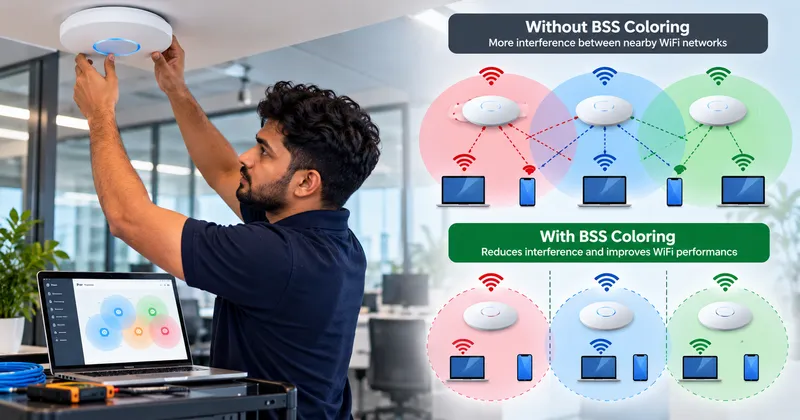
In modern wireless networks, compatible devices can identify the BSS (Basic Service Set) color included with a transmission. By tagging each transmission with a numerical identifier (a 6-bit color tag ranging from 1 to 63), client stations and access points can instantly distinguish between traffic on their own network and extraneous RF energy from adjacent properties:
- Same BSS: The transmission belongs to the device's own wireless network, so the client must wait.
- Different BSS: The transmission belongs to another nearby, independent wireless network (an overlapping BSS, or OBSS).
- Different BSS with a sufficiently weak signal: The device can treat the medium as clear and transmit simultaneously rather than waiting unnecessarily.
This mechanism dramatically changes traditional Clear Channel Assessment (CCA). Historically, under 802.11a/b/g/n/ac standards, any detected energy above a strict threshold (-82 dBm) forced a client device to pause its transmission, regardless of whether that signal belonged to an office next door or an apartment three floors away. BSS Coloring dynamically raises this threshold for foreign networks, opening up unprecedented spatial reuse.
Experiencing wireless congestion in a high-density UAE building?
FastWiFi engineers calibrate spatial reuse thresholds, clean up channel overlap, and install high-density enterprise WiFi 6 and WiFi 7 hardware.
WhatsApp Us Call UsWhy BSS Coloring Is Essential for Dense Environments in the UAE
Whether inside commercial high-rises in Business Bay and DIFC or dense apartment towers in Downtown Dubai, JBR, and Dubai Marina, RF channels are severely congested. When dozens of independent routers broadcast on identical 5 GHz or 6 GHz frequencies, legacy carrier-sense multiple access with collision avoidance (CSMA/CA) collapses into high contention wait-times.
BSS Coloring delivers tangible advantages:
Higher Network Capacity
Multiplies overall spectrum throughput by allowing non-interfering parallel transmissions.
Eliminates Unnecessary Waiting
Devices no longer hold packets when distant neighboring routers broadcast background frames.
Superior Real-World Speed
Improves latency and effective speed for end-users, even if maximum theoretical link rates remain unchanged.
BSS Coloring vs. Traditional Legacy WiFi
| Feature | Traditional WiFi (802.11a/b/g/n/ac) | WiFi 6 / 6E / 7 (802.11ax/be) with BSS Coloring |
|---|---|---|
| Neighbor Network Identification | Limited (Treats all RF energy as contention) | Instant (Reads 6-bit PHY color tag in preamble) |
| Co-Channel Interference Handling | Inefficient (Forces device to back off and wait) | Dynamic Spatial Reuse (Transmits concurrently over weak OBSS) |
| Dense Environment Performance | Collapses under high client concurrency | Maintains low latency and high spectrum efficiency |
How to Test WiFi Latency, Jitter, and Packet Loss
A common misconception among home and business owners in Dubai is assuming that high bandwidth (e.g., a 1 Gbps fiber subscription) automatically guarantees flawless performance. You can possess massive download capacity yet still suffer from stuttering Microsoft Teams calls, frozen Zoom conferences, dropped VoIP audio, and severe online gaming lag.
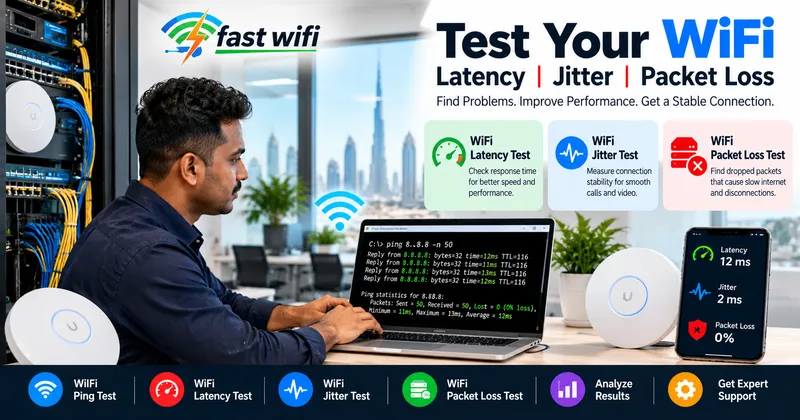
Evaluating real network quality requires assessing three foundational metrics:
- Latency (Ping): The round-trip time required for a packet to reach its destination and return (measured in milliseconds, ms). Under 20 ms is exceptional; 20–50 ms is great; over 150 ms severely impairs real-time apps.
- Jitter: The statistical variation in latency across successive packet arrivals. Even if latency averages 25 ms, sudden jumps to 120 ms create packet buffer overruns, resulting in choppy audio and robotic voices.
- Packet Loss: The percentage of transmitted packets that fail to arrive. A packet loss rate as low as 2% can cause VoIP calls to break up or drop entirely.
The Two-Step Diagnostic: Gateway vs. External Destination
Before assuming your internet service provider is responsible for poor performance, isolate the internal wireless link from the external ISP routing path using the Windows command prompt or macOS Terminal:
ping 192.168.1.1 -n 50
Step 2: Test an External Internet IP (Checks your link out to the web)
ping 8.8.8.8 -n 50
Diagnosing the Outcome: If your local router ping responds with 1–3 ms and 0% packet loss, but pinging 8.8.8.8 demonstrates 120 ms latency and 5% packet loss, your local WiFi is operating properly and the bottleneck resides with your telecom provider or upstream DNS. Conversely, if your ping to 192.168.1.1 exhibits fluctuating response times (e.g., 2 ms, 4 ms, 85 ms, 140 ms, 3 ms), the issue is local RF interference, channel saturation, poor access point placement, or wall attenuation.
For definitive validation, run the exact same test connected via a physical Cat6 patch cable. If wired performance is clean while wireless is unstable, your physical wireless infrastructure requires re-engineering.
Need an enterprise diagnostic audit of your network?
FastWiFi utilizes industry-leading spectrum analyzers and Fluke cable certifiers to pinpoint jitter, frame retransmissions, and packet loss.
WhatsApp Us Call UsBest WiFi Setup for a 2-Storey Villa in the UAE: Access Points vs. Mesh
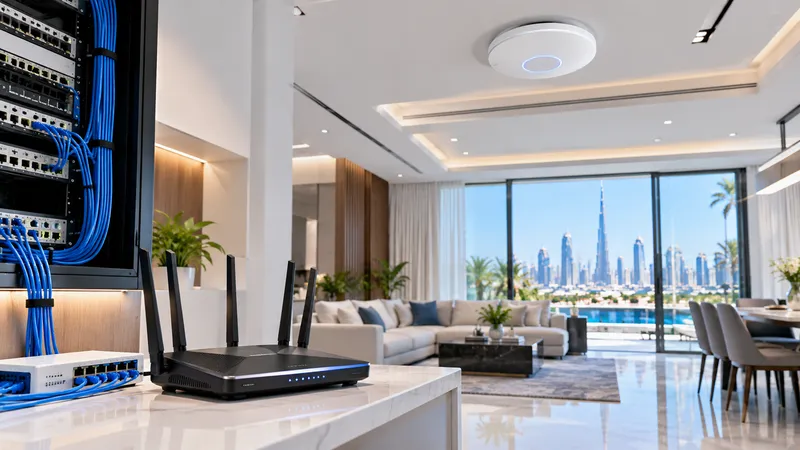
Residential architecture in the UAE is celebrated for its elegance and scale. However, two-storey luxury villas in communities such as Palm Jumeirah, Arabian Ranches, Dubai Hills Estate, Emirates Hills, and Sobha Hartland present major physical hurdles for radio waves. Heavy poured-concrete floor slabs, steel rebar, thick thermal exterior blocks, and internal concrete partitions act as dense shields that block RF broadcasts.
Placing a single high-powered router in a ground-floor telecom closet or entrance hallway inevitably leaves the upstairs bedrooms, home offices, and garden terraces in total dead zones.
Hardwired Access Points vs. Wireless Mesh: A Structural Comparison
| Feature | Dedicated Wired Access Points (APs) | Consumer Wireless Mesh Systems |
|---|---|---|
| Inter-Device Backhaul | Dedicated Cat6/Cat6A Gigabit Ethernet cable | Shared over-the-air 5 GHz wireless channels |
| Throughput Retention | 100% of incoming ISP speed delivered to each AP | 50% bandwidth loss per wireless node hop |
| Performance Through Concrete | Zero degradation (signal travels through wire) | Severely impaired by thick inter-floor slabs |
| Power Delivery | Power over Ethernet (PoE) cleanly from switch | Requires bulky 220V wall power adapters |
| Ideal Deployment | Permanent villas, high-load homes, luxury estates | Rented properties where drilling is restricted |
The Gold Standard: Wired Mesh (Ethernet Backhaul)
Homeowners often believe they must pick strictly between access points and mesh systems. In reality, the most reliable villa installation combines the user-friendly roaming management of modern systems with the physical permanence of copper Ethernet: Wired Ethernet Backhaul.
By pulling certified Cat6/Cat6A data cabling from the main server rack or telecom box up to discreet ceiling mounts on the first floor and out to external garden perimeters, every wireless node transmits without having to bounce signals across concrete ceilings. Systems such as TP-Link Deco, Linksys Velop, and ASUS AiMesh dynamically shift into wired backhaul mode when plugged into an Ethernet jack, freeing 100% of their wireless bands to communicate with your smartphones, smart TVs, CCTV, and gaming consoles.
Recommended Architecture for a Two-Storey Villa
↓
Core Gateway Router / Firewall Appliance
↓
Managed Gigabit PoE+ Network Switch
├──> [Solid Cat6 Cable] ──> Ground Floor Central AP (Living/Dining/Kitchen)
├──> [Solid Cat6 Cable] ──> First Floor Central AP (Bedrooms/Family Lounge)
└──> [Shielded Outdoor Cable] ──> Exterior IP67 AP (Pool/Garden/Majlis)
This proven topology guarantees that moving between your upstairs study and poolside patio preserves seamless handoff (802.11k/v/r) without dropped calls, latency spikes, or signal drops.
Brands We Support
We work with almost every popular router, access point, networking, and WiFi system brand available in the UAE market, ensuring complete hardware integration and optimal configuration:
We Serve
Comprehensive network design, WiFi installation, and infrastructure maintenance across all residential and commercial sectors:
Serving All Over the UAE — Finding a Reliable Network Specialist Near Me
Whether you are searching for a certified WiFi technician near me, need urgent latency troubleshooting, or require a complete structured cabling fit-out, FastWiFi delivers rapid on-site dispatch across all seven Emirates:
Dubai :
Business Bay, Downtown Dubai, DIFC, Dubai Marina, JLT (Jumeirah Lake Towers), JBR, Palm Jumeirah, Dubai Media City, Dubai Internet City, Dubai Knowledge Park, Al Barsha, Al Quoz, Deira, Bur Dubai, Silicon Oasis, JVC, Dubai South, DWC, DIP, Al Qusais, Al Twar, Al Warqa, Nad Al Hamar, Tilal Al Ghaf, Damac Hills 2, Dubai City Walk, Dubai Hills Estate, Discovery Gardens, Arabian Ranches, Oud Metha, Al Khawaneej, Al Mizhar, Muhaisnah, Sobha Hartland, Meydan, Emaar South, Umm Ramool, Umm Al Sheif, Al Bada'a, Al Hudaiba, Dubai Science Park.
Abu Dhabi :
Al Maryah Island, Reem Island, Yas Island, Saadiyat Island, Khalifa City, Mussafah Industrial Area, Al Raha Beach, Mohammed Bin Zayed City (MBZ), KIZAD, ICAD, Corniche, Al Bateen, Al Khalidiyah.
Sharjah:
Al Majaz, Muwaileh Commercial, Al Nahda, Al Khan, Al Taawun, Al Qasimia, Sharjah Waterfront City, University City, SAIF Zone, Industrial Areas 1 to 18, Al Dhaid, Kalba, Khorfakkan.
Northern Emirates:
Ajman: Aamra, Aalia, Al Nuaimia, Al Rawda, Al Jurf, Al Rashidiya, Al Mowaihat, Al Zorah, Manama, Masfout.
Umm Al Quwain: Industrial Area, Al Salama.
Ras Al Khaimah: Al Hamra Village, Al Marjan Island, Nakheel.
Fujairah: City Centre, Port of Fujairah, Dibba.
Our Review Words Across the UAE
"We struggled with terrible WiFi coverage upstairs in our two-storey villa in Dubai Hills. FastWiFi's team pulled discreet Cat6 cables through our existing conduits and mounted enterprise ceiling access points on both floors. Now we receive over 650 Mbps in every bedroom, zero ping spikes on gaming consoles, and seamless roaming. Best investment we've made!"
— Villa Owner, Dubai Hills Estate, Dubai
"Our corporate trading office in Downtown Dubai was constantly suffering from packet loss and high jitter during executive Microsoft Teams calls. FastWiFi audited our switches, re-tuned our WiFi 6 channels using BSS Coloring, and isolated our staff and guest traffic. The call drops stopped immediately. Unrivaled technical competence."
— Managing Director, Investment Management Group, Downtown Dubai
Expert Support Beyond Installation and Delivery
Reliable Ongoing Support After Installation
Our commitment doesn’t end with installation. We provide reliable ongoing support and maintenance to help keep your network fast, secure, stable, and performing at its best throughout the year. Whether you need troubleshooting, optimization, upgrades, or routine maintenance, our team is here to help keep your network running smoothly.
Every structured cabling project, access point installation, and enterprise wireless network we deploy includes systematic cable labeling, Fluke certification reports, and dedicated annual maintenance support options across the UAE.
Frequently Asked Questions
Why is my internet speed test high while my Zoom calls and online gaming still lag?
Traditional speed tests only measure bulk bandwidth download capacity over a few seconds. Real-time applications like Zoom, VoIP, and gaming depend on low latency and low jitter (steady packet arrival times) with 0% packet loss. If your local WiFi suffers from co-channel interference or channel saturation, packets get delayed or dropped, causing audio stutter and video freezing even on a 1 Gbps fiber subscription.
Can I get an experienced WiFi technician near me in Dubai or Abu Dhabi today?
Yes. FastWiFi maintains dedicated mobile engineering units operating throughout Dubai, Abu Dhabi, and Sharjah, with rapid response teams covering the Northern Emirates. We provide same-day or next-day on-site site visits for network diagnostics, latency troubleshooting, and wireless access point installations.
What is your process for installing WiFi across a two-storey villa in Dubai?
We start with an on-site RF spectrum audit and structural inspection to evaluate floor plans, ceiling heights, concrete wall thickness, and conduit pathways. We then pull certified Cat6/Cat6A cables to centralized ceiling positions on the ground and upper floors, install commercial PoE access points, configure optimal channel frequencies and roaming protocols (802.11k/v/r), and test throughput across every room before client handover.
Why is a hardwired Ethernet backhaul superior to wireless mesh in a concrete villa?
Wireless mesh nodes communicate with each other over the air. In UAE villas with heavy reinforced concrete floor slabs, the wireless signal passing between nodes is severely attenuated, resulting in a 50% or higher speed loss per hop. A hardwired Cat6 Ethernet backhaul transmits data through physical copper with zero attenuation, delivering 100% of your incoming fiber internet speed directly to each access point.
Do you provide annual maintenance contracts (AMC) for villa and business networks?
Yes. Our annual maintenance contracts cover scheduled router and access point firmware updates, RF channel re-optimization, security audits, cable re-testing, and priority emergency dispatch to ensure your network runs at peak performance year-round.
Our Specialized Network & Infrastructure Services
Get Flawless, High-Speed WiFi Across Your Property Today
Connect with our certified network engineers today for an on-site RF survey, latency diagnostics, professional villa access point installation, or commercial structured cabling across the UAE.
Related Network Services
Villa WiFi Installation Dubai | 2-Storey Villa Network Setup Abu Dhabi | WiFi Latency and Jitter Testing | WiFi 6 BSS Coloring Optimization | Access Point Installation Near Me | Hardwired Mesh WiFi Dubai | Cat6A Structured Cabling UAE | Cisco Access Point Setup | Ubiquiti UniFi Villa WiFi | Low Voltage Contractor Dubai | Commercial Wireless Site Survey | Multi-Floor Roaming Optimization.
Popular Searches
Best WiFi setup for 2 storey villa UAE, how to fix weak WiFi upstairs in villa, access points vs mesh for concrete walls, test WiFi jitter and packet loss online, what is BSS coloring in WiFi 6, why does my Zoom call freeze on WiFi, WiFi technician near me Dubai, Etisalat router setup for large villa.